

Recruiting for your guild
Post what your guild is looking for on the recruitment board and players apply from there and from your guild's page. Officers read applications in guild tools.
The recruitment post
- Where you play (region, realm, faction and ruleset), what the guild is for, the days and times you raid, the classes, specs and roles you want, your language, a description and your Discord invite.
- Your guild's size and progress come from ForeverDB's own data.
- Checked before it shows, like every post on the board. A post runs for 30 days after it's saved or renewed.
On your guild page
- A Recruiting bar with the roles and the classes you want, and an Apply button.
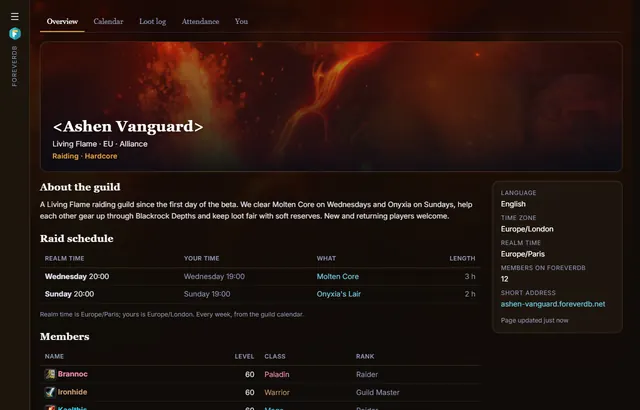
- Your raid schedule, progress and records, so players can see what they'd join.
Applications
Apply sends the player's message and character to your officers: into the Applications tab of guild tools and to your guild's Discord. Officers accept or decline, and an accepted player is told which officer to whisper in game.
Questions
Can players find us by class or role?
Yes. The recruitment board filters by region, realm, faction, ruleset, what the guild is for, class, role and language.
Get it for your guild
- Members install the ForeverDB addon and play. It reads the guild roster when you log in.
- They send it with the ForeverDB Uploader (automatic) or from the WoW folder. That's how ForeverDB knows who's in the guild.
- The Guild Master or an officer opens guild tools, then the Guild page tab: picks a banner, writes a few lines and claims the guild's address.