

Discord raid reminders
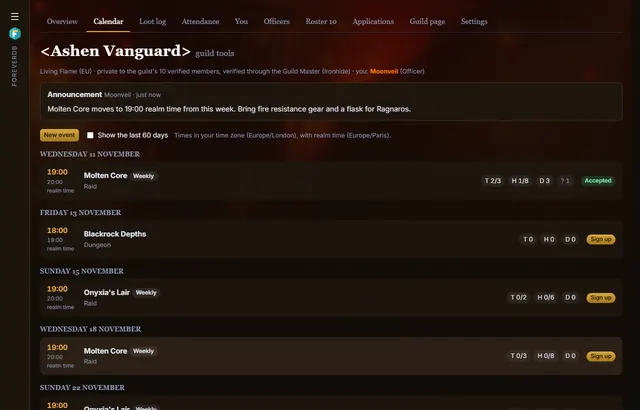
Paste a Discord webhook into guild tools and your guild's channel gets every new event, a reminder before it starts and any change of time or place. There's no bot to invite and nothing to host.
What gets posted
- New events as officers post them, and each week of a repeating event ahead of time.
- A reminder before the event starts: an hour by default, or as long before as you choose.
- A new time or place when an officer changes the event.
Setting it up
- In Discord, open the channel's settings, then Integrations, Webhooks and New Webhook, and copy its URL. You need the Manage Webhooks permission.
- In guild tools, the Guild Master pastes it in Settings and sends a test message.
- Deleting the webhook in Discord stops the posts.
Email and calendars too
Members who prefer email can have reminder emails, after confirming their address. Every email has a link that stops them and deletes the address. Everyone also has a private calendar feed for Google Calendar, Outlook or Apple Calendar.
Questions
Does the ForeverDB bot need to be on our server?
No. A channel webhook is enough.
Can raids show live in Discord?
Yes, with live logs: one message in your raid channel, updated after every pull with kills, wipes, deaths and the meters.
Get it for your guild
- Members install the ForeverDB addon and play. It reads the guild roster when you log in.
- They send it with the ForeverDB Uploader (automatic) or from the WoW folder. That's how ForeverDB knows who's in the guild.
- The Guild Master or an officer opens guild tools, then the Guild page tab: picks a banner, writes a few lines and claims the guild's address.