

Raid calendar and sign-ups
Post your guild's raid and dungeon nights once or every week, and members sign up with the character and role they're bringing. ForeverDB keeps the list, the limits and the waitlist, and shows every time in each member's own time zone.
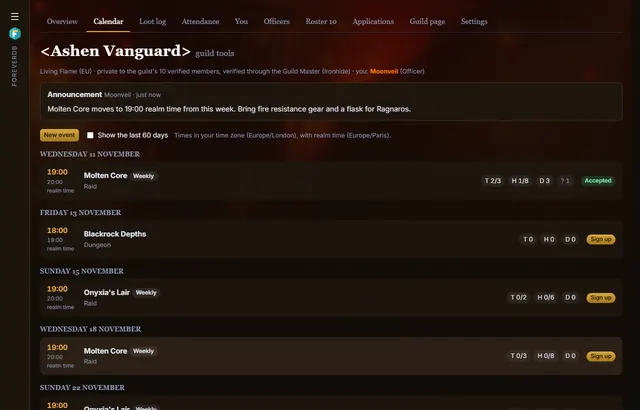
Posting an event
- Officers pick any dungeon or raid on ForeverDB, with its bosses, or a plain guild event.
- Once or every week at the same time, with notes and limits for tanks, healers and DPS.
- Each week of a repeating event is posted ahead of time (you choose how far), with realm time beside each member's own.
Signing up
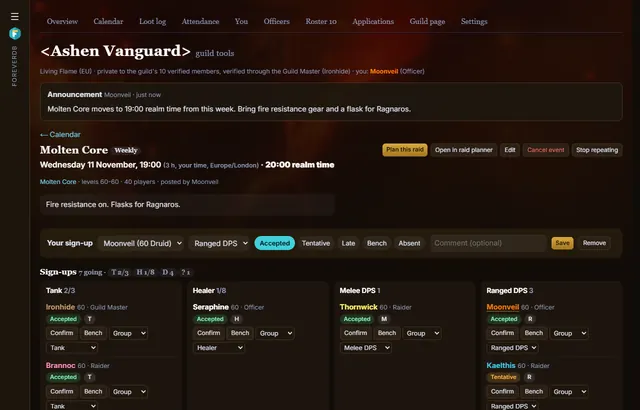
- Members pick a character and a role: accepted, tentative, late, bench or absent, with a comment.
- When the tank, healer or DPS limit or the group size is full, more sign-ups go on a waitlist in order. When someone drops out, the next one moves up and is told.
- Officers confirm people, bench them and sort them into groups.
On raid night
- One click opens the raid planner with the signed-up group in it, ready for positions, assignments and a simulated pull.
- A gear and readiness check marks each member who shares their character green, amber or red for the event, with the reasons.
- A new time or place is posted to Discord and emailed to members who asked for emails.
Questions
Can members add it to Google Calendar?
Yes. Everyone gets a private calendar feed for Google Calendar, Outlook or Apple Calendar.
Do members need the addon?
To be verified as members, yes: ForeverDB knows who's in the guild from members' uploads with the ForeverDB addon.
Is the calendar public?
No. Events and sign-ups are private to the guild's verified members. The public guild page shows only the instance and time of weekly events.
Get it for your guild
- Members install the ForeverDB addon and play. It reads the guild roster when you log in.
- They send it with the ForeverDB Uploader (automatic) or from the WoW folder. That's how ForeverDB knows who's in the guild.
- The Guild Master or an officer opens guild tools, then the Guild page tab: picks a banner, writes a few lines and claims the guild's address.