

ForeverDB: the free addon for WoW Forever
One free addon from ForeverDB.net that brings the site into the game: your quests, dungeons, gear, goals and group. It works with any interface and needs no account.
ForeverDB
A quest helper, dungeon run plans, a wishlist and goals, gear upgrades and a rotation assistant, in one download.
- Helps by itself while you play: upgrades, quest rewards, the next spell to press, what to buy and learn
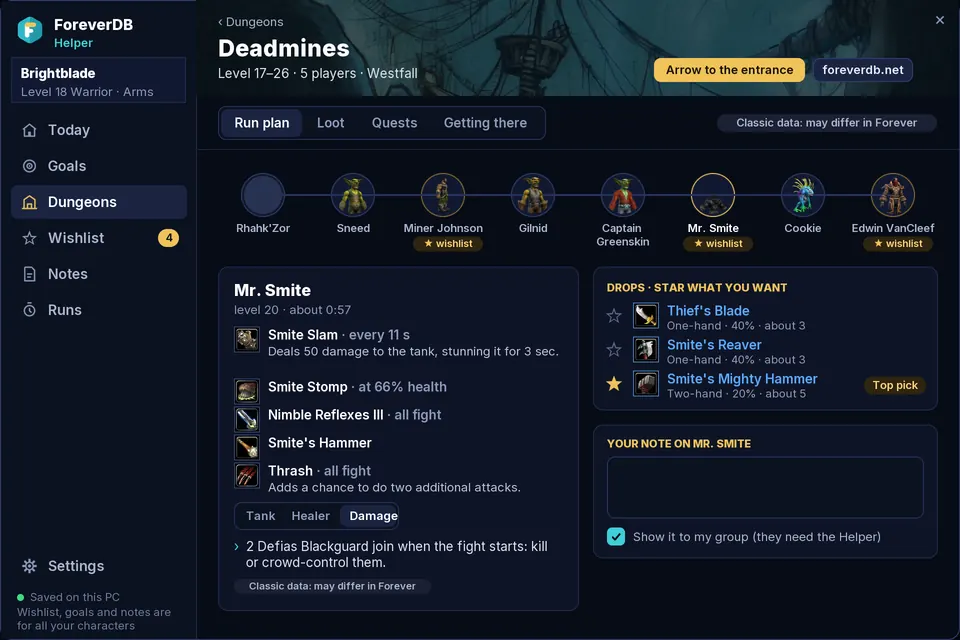
- Plans your dungeons, wishlist, goals, notes and runs in its own window
- Works on top of ElvUI, EllesmereUI, Bartender4, Dominos or Blizzard's own
Or install and update it with an addon app: CurseForge, Wago
The zip has two folders, ForeverDB and ForeverDB_Helper: copy both. Each has its own page: help while you play and dungeons, wishlist and goals.
What it does
Quest helper
- Quest pins on the world map and the minimap: where quests start, where to hand them in and where your objectives are
- The arrow follows the quest you pick in Blizzard's tracker, quest log or map, and moves on to the next objective or the turn-in
- Blizzard's quest tracker shows how far away each quest is ("251 yd")
- The ForeverDB guide beside Blizzard's quest log: where to go, what to kill or collect, what drops the items, the best reward for you and the quests before and after
- Quest progress on creature and item tooltips
Dungeon run plans
- A run plan for every dungeon and raid: bosses in order, their abilities with timings and tips for your role
- Each boss's drops with a wishlist star and the top pick for your spec, and the whole loot table with how many runs an item takes
- The dungeon's quests with arrows to their givers, and how to get there
- A small panel inside the dungeon: bosses killed, the next boss with your note, and what your group still needs
Wishlist, goals and notes
- A wishlist that tells you when your item drops, even when someone else in the group loots it
- Goals whose tasks tick themselves as you play, with an on-screen tracker
- Notes on a dungeon, a boss or a quest that show where they belong, and that your group can see
Gear upgrades and best gear
- Upgrade tooltips for your spec, and the best quest reward picked for you
- A pop-up with an Equip button when an upgrade lands in your bags
- Your best gear for your level, PvE or PvP, next to what you wear, with where each item comes from
- Forever's scrolls: what each does, which you've had and where players found them
Rotation assistant
- A rotation assistant that lights up the next spell to press, with its key
- It times cooldowns and DoTs from your casts, since Forever hides them from addons in combat
- Your spec's rotation card, and your next talent point
About the rotation assistant →
Vendors, trainers and professions
- What's worth buying lights up at vendors
- What's new at your trainer when you level, with a map pin to your trainer
- A finder for who sells or teaches an item, a weapon skill or a profession
- Your next profession step, what to craft for skill and the best gathering zones
Timed runs
- Every dungeon run timed and recorded by itself: bosses with kill times, wipes, what you got and your best time
- The run timer on the panel inside the dungeon
Group and raid tools
- A buff check on every ready check, raid notes from the raid planner and your guild's soft reserves
- Automatic combat logging in dungeons and raids, for the replay page
- Your character as a share code for the armory, the sim and the gear planner
Bot and gold-spam check
- Spots gold and boost spam in public chat and players farming one spot for hours
- Can hide the spam, and offers to open Blizzard's report window: it never reports anyone by itself
- Names never leave your PC
Optional: the ForeverDB Uploader, a small Windows app, keeps the addon up to date and sends what it records by itself. You don't need it: send from your WoW folder, or paste a code from the game.
Help reveal Blizzard's hidden items
Blizzard hid 12,597 of the beta's items from dataminers: no name and no stats until someone finds one in game. The Uploader sends the stats your game receives, so everyone can see them. 4,637 revealed so far: see the hidden items tracker.
Install
- Download the zip and open it, or install ForeverDB from CurseForge or Wago.
- Copy both folders inside,
ForeverDBandForeverDB_Helper, intoWorld of Warcraft\_classic_beta_\Interface\AddOns. Make theAddOnsfolder if it isn't there. - Restart the game or type
/reload, and tick ForeverDB.net Companion and ForeverDB Helper in the AddOns list on the character screen. - Open the help-while-you-play window from the book by your minimap (
/fdb), and your dungeons, wishlist, goals, notes and runs from the ForeverDB button by your minimap (/fdh).
Questions
Why two folders?
ForeverDB is one addon in two folders for now: ForeverDB helps while you play, ForeverDB_Helper keeps your dungeons, wishlist, goals, notes and runs. They work together, and you can switch either off in the AddOns list. If you had the Companion or the Helper before, this is the same addon: replace the folders and everything you saved is kept.
Is it safe?
Yes. It's an ordinary addon that runs inside the game like any other: it can't use the internet, touch files on your PC or play for you. It's free, needs no account, and the download's SHA-256 checksum is on its page.
Does it work with ElvUI or EllesmereUI?
Yes. It doesn't replace your interface: it works on top of ElvUI, EllesmereUI, Bartender4, Dominos or Blizzard's own.
How do I update?
CurseForge and Wago update it for you. Without them, download the latest zip from this page and replace both folders. Your settings, wishlist, goals and notes are kept, because the game saves them in your WTF folder. The optional Uploader updates it by itself.