

Esta página aún no está traducida. Versión en inglés
Raid plans: your boss strategy, drawn on the raid's map
Raid leaders draw their own plan for each boss on the instance's real map, in guild tools under Raid plans. A plan is kept for the guild and reused every week. Press Show to the raid and every member's map moves to the step you're on, on the website and in game with the ForeverDB addon.
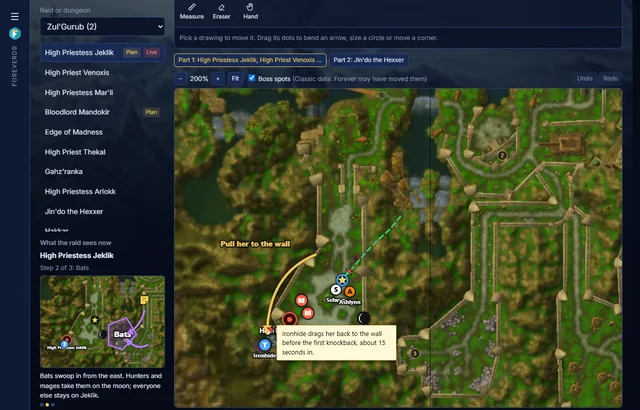
Proper drawing tools
- Pen and Route: draw freehand, smoothed when you let go. A route ends in an arrow, for where to run.
- Curved arrows and lines: drag from start to end, then drag the middle dot to bend the arrow around a pillar or a pack.
- Circles in yards: drag out from the middle and the size shows in yards, from the map's own scale. The Measure tool checks any distance.
- Areas: click the corners of a fire patch, a safe spot or where the adds land, filled in a colour of your choice.
- Raid markers, roles and players: the eight raid markers, tank, healer, melee and ranged dots, and your members by name in their class colour.
- Bosses, adds and text, with eight colours, line widths, dashed lines, undo and redo, and zoom for big raids.
Notes on the map
Pin a note anywhere on the map, or put a note on any drawing: a route, an arrow, a circle. Like a comment on a spreadsheet cell, a drawing with a note gets a small red corner flag, and the note shows when you point at it. The map stays clean and the detail is there for whoever wants it.
Steps and a written guide
Each boss has up to 12 steps, such as the pull, the bats and the landing, each with its own drawing and a short note, and a written guide for the whole fight. Copy a step to start the next one from where the last left off.
Shown live to the raid
- Officers press Show to the raid, and the step they're on is what every member's plan shows. Members tick Follow the raid leader, which is on by default.
- The guild page's Raid night live page shows the same step in a mini map, beside a live log of the night.
- In game, the ForeverDB addon's Raid plan window draws the plan over the instance map. When the raid leader or an assistant moves to the next step, every raid member's window follows.
Who can do what
Officers whose rank has the guild's events permission draw, save and present plans. Every verified member of the guild can see them. Plans are private to the guild: they're never on the public page except the live step in the Raid night live mini map, which only members see.
Questions
Which raids and dungeons have a map?
Every raid and dungeon with a map on ForeverDB: 46 today, from Molten Core, Zul'Gurub and Naxxramas to the dungeons. The maps are stitched from the WoW Forever client's own minimap art, the same ones the dungeon pages and the addon use.
Do I have to draw a new plan every week?
No. A plan belongs to the guild, the raid and the boss, so next week's raid uses the same plan. Change it whenever your strategy changes.
How does the plan get into the game?
With the ForeverDB addon. The raid code you copy from the event's raid page carries the plans, and the raid leader's addon also sends each boss's plan to raid members who run ForeverDB.
Is it free?
Yes, like the rest of guild tools.
Get it for your guild
- Members install the ForeverDB addon and play. It reads the guild roster when you log in.
- They send it with the ForeverDB Uploader (automatic) or from the WoW folder. That's how ForeverDB knows who's in the guild.
- The Guild Master or an officer opens guild tools, then the Guild page tab: picks a banner, writes a few lines and claims the guild's address.