

Esta página aún no está traducida. Versión en inglés
Raid night live
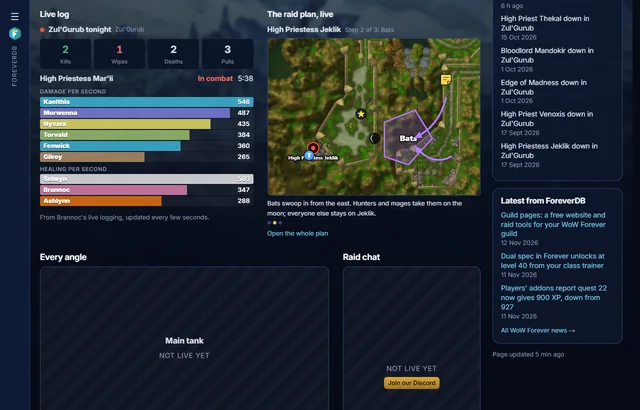
Every guild page has a Raid night live page, for the members who can't make it tonight and anyone who wants to follow along: the raid's log in real time, the plan's current step on a mini map, every stream at once and the guild's Discord chat beside them.
The live log
A raider turns on Live logging on ForeverDB (Chrome or Edge, nothing to install) and presses Feed my live logging in guild tools, Raid plans. The page then shows the night's kills, wipes, deaths and pulls, and while a fight is on, the damage and healing meters so far, updated every few seconds. Everyone who can see the guild's page sees the board, and the button says so before anyone presses it.
The plan's mini map
- How to draw a plan and show it to the raid: Raid plans.
When an officer shows a step of a raid plan to the raid, the mini map on Raid night live moves to it, zoomed in on the part of the map the plan uses. Point at a note flag to read the note. Only the guild's verified members see the plan.
Streams and chat
Up to four Twitch or YouTube streams side by side, such as the main tank, a healer and the raid leader, with any of them made big, and the guild's Discord channel next to them. Officers change any of it in the page editor.
Questions
Where do I find it?
On your guild's page, in the Raid night live tab. A guild that hasn't made its own pages yet has one ready.
Does the live log need the Uploader?
No. Live logging runs in the browser and reads the game's combat log as it's written, so there's nothing to install.
Get it for your guild
- Members install the ForeverDB addon and play. It reads the guild roster when you log in.
- They send it with the ForeverDB Uploader (automatic) or from the WoW folder. That's how ForeverDB knows who's in the guild.
- The Guild Master or an officer opens guild tools, then the Guild page tab: picks a banner, writes a few lines and claims the guild's address.